Sunday, 6 June 2010

Senses - How its been coded...

So there are lots of things that go into my Senses Project so here's how I have done some of them.

The Server:
This runs most of the processing algorithms, including facial detection/recognition, speech recognition and Optical Character Recognition(OCR). So lets Break them down:

Speech Recognition - Uses Windows built in Speech API (SAPI) for Speech Recognition and Text to speech

Optical Character Recognition - Uses the OCR engine built into Office 2007 Imaging

Facial Recognition - This was a tricky one to find, but in the end I am using a trial version of the .Net facial recognition framework created by Luxand. The images that get processed are extracted from the users computer and the users friends off of Facebook using the Facebook .Net API found on Codeplex

The Windows Mobile Device
This is just your run of the mill Windows Mobile .Net Compact framework app, it communicates with the Server and transmits data such as audio and images. The interface is the interesting part though, how do you design a UI for a blind person?
The UI - As the user can not see the items on the screen, whenever they move their finger over them. Text to Speech kicks in and tells them the option, when they find the one they want they just have to double tap ...simple!
Windows Embedded & .Net Micro 'thingy'
The heart of the solution is a Windows Embedded device, an eBox 3300. This runs some of the image processing shizzle and performs the solutions audio functionality. It is connected to another device running the .Net Micro Framework and has a screen which provides information as the eBox itself won't be connected to a PC.

Friday, 4 June 2010

Imagine Cup 2010 - I'm through to the finals!

Well its been a busy couple of weeks but yet another piece of amazing news has happened to me. My embedded entry for this years Imagine Cup has been selected and I am off to Warsaw at the start of July to represent the UK.

So what's my big Idea?

Well after seeing a visually impaired person struggling in a supermarket I thought that technology could help, therefore I designed Senses.

It is an augmented reality system for blind and partially sighted people, incorporating visual, tactile and audio interfaces. Utilising the latest Windows Embedded, mobile and cloud technologies this project aims to improve overall quality of life, this is achieved by providing a means to better perform day to day tasks, such as reading text, identifying objects and people, and avoiding obstacles when walking.

This would be achieved by affectively adding a second set of eyes via the use of an external wide focus web camera attached to the user, and a more precise camera within a pre-existing Windows mobile device. These cameras would provide such tasks as Object Recognition, Facial Recognition and Optical Character Recognition (OCR). The augmented reality interaction between the user and the device would come via speech recognition via a wearable microphone, and response would come from text to speech functionally in a set of headphones.

If you are interested, check out my promotional video on youtube.

Friday, 28 May 2010

My Final Year Project

Well I guess a few of you noticed that I haven't updated my blog recently, this was mainly due to me finishing my Final Year Project at Uni. So I thought I would explain what it was about.

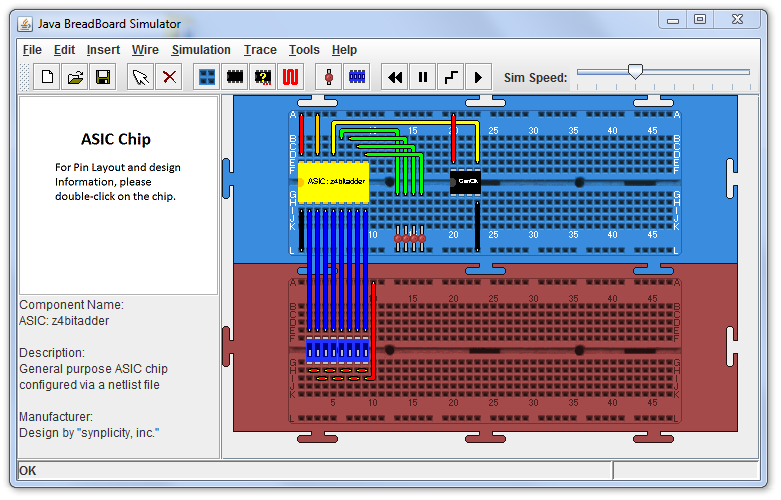
Our department created through several student projects a digital circuit simulator in Java.


It allows users to add a variety of different components, wire them up and then simulate them. Great for electronics hobbyists or students.

What I did was extend this so Field Programmable Gate Arrays (FPGA's) could be simulated using the tool.

An FPGA is made up of a combination of Logic Blocks, IO Blocks and interconnections wiring everything up.

Each logic block is made up of a variety of different primitive components interconnected, usually this consists of a Look Up Table, Multiplexer and some combinational logic. Below is a very simple CLB from an early Xilinx FPGA.


Now the important thing for me are the primitive components, which I have to model individually. Which in the case of the Xilinx XC2000, a very early FPGA is over 400 different components! Below is the same CLB but with the primitives highlighted.

Using an Event-Driven Discrete Modelling Simulation, these primitives were modelled and their interconnections simulated. Thus creating a working model.
And whats more, it only took around 35,000 lines of code!

Wednesday, 18 November 2009

Imagine Cup 2010

So its that time of year again where things start to ramp up for the Imagine Cup, which this year is being held in Poland.

For those of you that don't know what the Imagine Cup is, it is the worlds largest student technology competition that brings out the smartest students to help solve some of the worlds largest problems. Like last year it will be themed around the 8 Millennium goals set out by the UN, however to help you along the way, the UK team have contacted various charities to give possible ideas on projects that you can implement. To have a look at these and to find out more, visit the UK imagine cup website:


I'm still alive

Well its been a hectic few weeks, but yes I am still alive and I have a lot of content to post to my blog, some of which:

My uni project using MS technologies
Visual Studio 2010
Review of my Wireless Mobile Mouse 6000
What virtualisation tool is best to run Windows on Mac

Along with this I will have the usual talks about various projects I've been working on and my entry into the imagine cup.

Thursday, 11 June 2009

JavaScript WebEngine


Wouldn't it be cool if you could run Javascript applications like normal desktop applications, where each app has its own window and where Window Management and Composition is handled for you, and where events are passed easier and with better cross browser support. Well this is what I've been trying to achieve with my WebEngine project.


All that is needed is an xml file containing the location of the Javascript file, the initially executed function and a few other optional fields such as description. (There is an IconUrl tag as in the future applications will be launched from the cloud desktop)

Paint.js
Paint.png
Paint
load_init

Within the Javascript file for your app all you need to do if have the initially called function have the variable uID passed to it - this is the globally unique identifier for your application that the composition engine associates with the application.

function HelloWorld(uID) {

}

The first thing you need to go is get the HTML 5 canvas element thats been created as the graphics layer for your application, you can resize the canvas and it will resize the application window when the composition engine next renders.

function HelloWorld(uID) {
// Store the canvas and its 2d context
hw_canvas = wec_GetCanvas(uID);

// Resize the window
hw_canvas.width = 300;
hw_canvas.height = 120;
}

Hooking up events is as simple as passing the applications uID and the event handler function, all the backend hookup and cross browser work is done for you.


// Hook up some events
wec_HookMouseDown(uID, hw_MouseDown);

...


function hw_MouseDown() {
alert("The Mouse has been Pressed");
}

Event information can be retrieved by the following:

var evt = wec_GetLastEvent(uID);

The event contains properties of the time of the event, mouse position(relative to the window), keys pressed etc.

In the coming version there will be a common widget library so it will be even easier to quickly make powerful Javascript applications that run on the framework.

Monday, 8 June 2009

Where the future takes me

Well I have finished my internship at Microsoft and now have the summer free to do a variety of different things, mostly I will be cycling around the country but still I have some spare time to do some coding.

So what should I be coding, well this started me thinking about whats to come with computers and so here are a few trends and themes that I believe will start to appear in applications and websites in the future.

Search Engines creating dynamic context based websites based on results.
Now what do I mean by this; well currently Search Engines such as Google or the new Microsoft Bing go off and find results and show the top 10 of a few million. Usually everyone goes to the top 1 or 2 sites, or more depending on the search term. Now I believe the style of Wolfram Alpha is the way forward where after guessing the context of the search information will be shown accordingly. Wolfram Alpha only showed many numerical information or facts; a bit like an encycopedia but where I see it, future search engines will parse pages (or hopefully in the futures webpages will expose sections for export) and a webpage will be dynamically created with information related to the search. 
In the mean time however I see better image and media searches; how hard would it be to use facial recognition on images to see hows in them - great for celeberities for example. Another good example is if someone searches for '[insert persons name] image gallery' it actually generates a gallery of images thus the person doesn't have to go through the individual pages. - well thats my 2 cents of web searches anyway.

Web Applications and Desktop Applications merging
With Silverlight, Google Gears and other toolsets its becoming easier and easier to create powerful web applications that can be pushed to the desktop. What I invisage is loading a website like an application where it takes the form of a host OS application window rather than a browser with icon and the like. To the regular user there would be little difference in usuability. This would take little effort, just a platform for the web applications to plug into and from there users could have the rich media experiences on their desktop. Silverlight has taken the first step into this domain with their offline support.

HTML 5 and standards
With HTML 5 on the way and all the cool stuff it brings to the table - the canvas control for me being the biggest win. Websites will be able to be radically improved as non-standard toolsets won't have to be learnt eg. Flash, Silverlight etc. With companies such as Google already setting the way in showing whats possible with HTML 5 and most modern browsers being able to support the toolset eg. Chrome, Firefox, Safari and Opera we will see IE dragging its heals into the 21st century. Hopefully IE may one day be standards complient (but I doubt it) and they will get rid of their properitery tools eg. Accelerators.

Computers in General - Cheap is cheerful
Moore's law is undeniable in the world of computers, where every 18 months the number of transistors in a PC of a price point doubles, usually resulting in a near doubling of speed. Though we have got to the point where most people's machines are capable of doing all they require and thus a faster, more powerful machine is no longer neccessary. Therefore I believe Moore's law will be turned on its head, where machines will get cheaper for the same performance and this can be clearly shown by the new craze in netbooks (though they will never beat my Psions that I hold so dear)

So really I have not much of an idea still what to code, but I may give  the dynamic search engine a go using the new HTML 5 technologies it brings to the table. Hopefully one day IE may even be able to render it correctly.